Last Updated: July 2026 · Reading Time: ~45 minutes · Reviewed by TrendForge Research
Cursor is an AI-first code editor that combines repository awareness, intelligent Agents, configurable Rules, terminal access, MCP integrations, and cloud-based automation into a unified development platform. This guide covers everything you need to know — plus downloadable rule templates and a copy-paste prompt library.
Part of: Best AI Coding Assistants (2026) · Cluster hub for Cursor deep dives
What is Cursor AI?
Cursor is an AI-first code editor built for modern software development.
While traditional IDEs rely primarily on syntax highlighting, autocomplete, and extensions, Cursor integrates large language models directly into the development workflow. Rather than acting as a simple code completion tool, it functions as an AI-powered programming assistant capable of understanding repositories, editing multiple files, running terminal commands, searching codebases, and assisting with complex development tasks.
Today, thousands of developers use Cursor for:
- Building new applications
- Refactoring legacy code
- Debugging and writing documentation
- Creating unit tests
- Understanding unfamiliar repositories
- Learning new frameworks
- Automating repetitive programming tasks
Unlike conventional code assistants, Cursor focuses on reducing the amount of manual context developers need to provide by combining project context, tools, and AI models into a unified workflow.
Why Cursor Has Become So Popular
AI-assisted software development has changed dramatically over the last few years. Instead of asking an AI to generate isolated snippets, developers increasingly expect it to understand an entire repository, reason across multiple files, execute terminal commands, and iteratively solve problems.
Cursor was designed around this workflow. Its AI Agent can search your codebase, edit files, invoke tools, interact with terminals, and use connected services through MCP integrations — allowing developers to delegate larger coding tasks with less manual coordination.
This shift makes Cursor feel less like an autocomplete engine and more like an engineering collaborator.
Who Should Use Cursor?
| Developer | Recommendation |
|---|---|
| React / Next.js Developers | Recommended |
| Python Developers | Recommended |
| Node.js Developers | Recommended |
| AI Engineers | Recommended |
| Backend Developers | Recommended |
| DevOps Engineers | Good |
| Students & Beginners | Good |
| Enterprise Teams | Recommended |
Key Features at a Glance
| Feature | Available |
|---|---|
| AI Agent | Included |
| Repository Search | Included |
| Multi-file Editing | Included |
| Terminal Commands | Included |
| Web Search | Included |
| Model Context Protocol (MCP) | Included |
| Rules System | Included |
| Cloud Agents | Included |
| Team Rules | Included |
| Git Integration | Included |
These features work together to support end-to-end development rather than isolated code generation.
How Cursor Agent Works
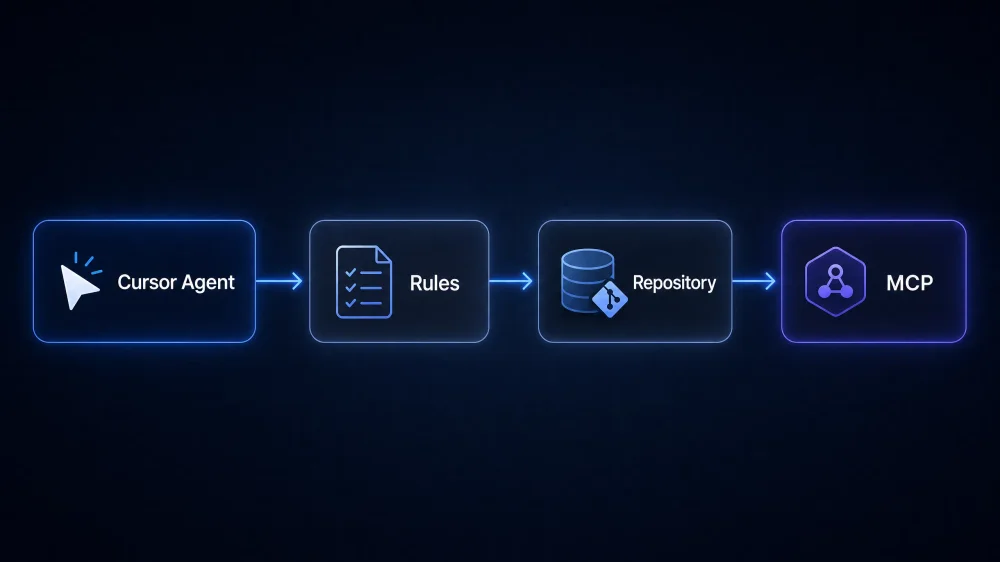
Cursor is built around three fundamental components:
- The AI Model — the underlying large language model selected for the task.
- The Agent — the orchestration layer that plans work, uses tools, and interacts with your project.
- Your Project Context — the repository, Rules, files, terminal output, and connected services.
graph TB
    subgraph Cursor Architecture
        M[AI Model] --> A[Cursor Agent]
        A --> R[Project Rules & AGENTS.md]
        A --> C[Repository Context]
        A --> T[Tools: Files, Terminal, Search]
        A --> MCP[MCP Integrations]
    end
    D[Developer Prompt] --> A
    A --> O[Edited Files & Results]
Instead of simply predicting the next line of code, the Agent can inspect project files, search the repository, edit multiple files, execute terminal commands, use connected MCP tools, and retrieve additional information through supported workflows.
Cursor vs Traditional IDEs
| Capability | Traditional IDE | Cursor |
|---|---|---|
| Syntax highlighting | Included | Included |
| Code completion | Included | Included |
| AI-assisted development | Not included | Included |
| Repository reasoning | Not included | Included |
| Multi-file editing | Not included | Included |
| AI Agent workflows | Not included | Included |
| MCP integrations | Not included | Included |
| Rules-based context | Not included | Included |
Rather than replacing familiar editor functionality, Cursor extends it with AI-native capabilities aimed at reducing repetitive development work.
Cursor Agent
The Cursor Agent is the core AI system that powers most of Cursor’s advanced capabilities. Unlike traditional code completion tools, the Agent is designed to reason about larger programming tasks — inspecting files, searching across your repository, editing multiple files, executing terminal commands, and coordinating multi-step workflows.
flowchart TD
    P[Developer Prompt] --> A[Cursor Agent]
    A --> R[Reads Rules & AGENTS.md]
    A --> S[Searches Repository]
    A --> M[Uses MCP Tools]
    A --> PL[Plans Changes]
    A --> E[Edits Files]
    A --> T[Runs Terminal Commands]
    E --> RES[Returns Results]
    T --> RES
In practice, you can ask the Agent to fix bugs spanning multiple files, refactor entire modules, generate documentation, write unit tests, explain unfamiliar codebases, update dependencies, and build new features from high-level instructions.
For a complete breakdown of Agent modes, workflows, and advanced techniques, see our dedicated guides below.
Project Rules
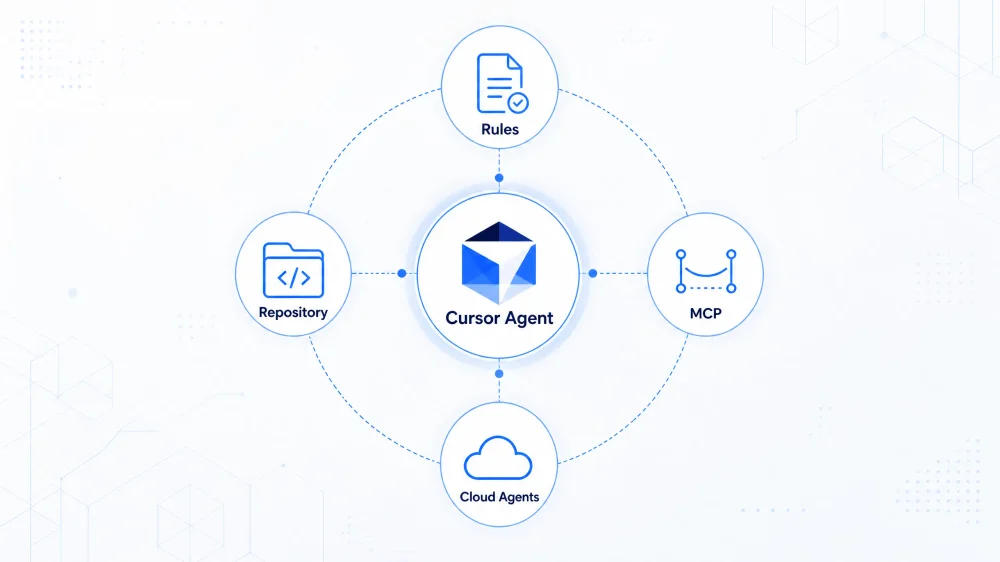
Project Rules provide persistent, workspace-level instructions for Cursor AI. Stored inside .cursor/rules/, they ensure the AI agent follows consistent coding standards across your entire project.
Downloadable Rule Templates
One of the fastest ways to improve Cursor output is configuring Rules before you start generating code. We’ve published production-ready .cursor/rules template packs you can download and drop into any project:
| Framework | Includes | Get Templates |
|---|---|---|
| React | react, typescript, tailwind, testing | Download React pack |
| Next.js | nextjs, react, api-routes, typescript | Download Next.js pack |
| Astro | astro, content-collections, typescript | Download Astro pack |
| Python | python, fastapi, testing | Download Python pack |
| Node.js | nodejs, express, typescript | Download Node.js pack |
| Laravel | laravel, php, testing | Download Laravel pack |
How to install: Copy the .mdc files into your project’s .cursor/rules/ directory, adjust globs to match your file paths, and commit to version control so your team shares the same conventions.
Full index with all files: Cursor Rules Templates README
All frameworks (ZIP): Download cursor-rules-templates.zip
Prompt Library
Copy-paste prompts accelerate common tasks. Here are the most useful ones — the full library with 20+ prompts is available as a downloadable Markdown file.
Bug Fixing
There's a bug in [describe symptom]. Search the codebase for the relevant files,
identify the root cause, fix it with minimal changes, and run the existing tests.
Explain what caused the bug before making edits.
New Feature
Implement [feature description] following our project conventions in .cursor/rules/.
Break the work into steps, search the codebase for similar patterns first, then
implement with tests.
Code Review
Review the changes in my working tree. Check for bugs, security issues, missing
error handling, and violations of our project rules. List findings by severity.
Repository Understanding
Give me an architecture overview of this repository: folder structure, key modules,
data flow, and tech stack. Point to the most important files to read first.
Refactoring
Refactor [file/module path] to improve readability and maintainability.
Keep all existing behavior and public APIs unchanged. Run tests after refactoring.
Model Context Protocol (MCP)
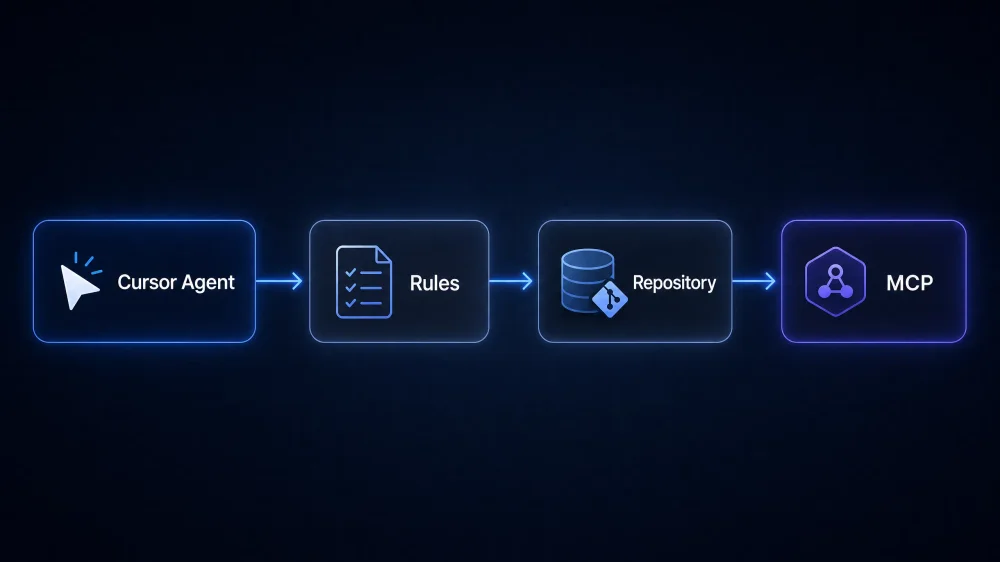
MCP is a universal bridge that allows AI assistants to communicate with external tools, services, and data sources using a standard interface. Instead of limiting the Agent to files inside your repository, MCP enables interaction with GitHub, Linear, databases, Cloudflare, Figma, and custom APIs.
graph TB
    D[Developer] --> CA[Cursor Agent]
    CA --> GH[GitHub]
    CA --> CF[Cloudflare]
    CA --> DB[Database]
    CA --> DOC[Documentation]
    CA --> API[Custom APIs]
Without MCP: the Agent works only with your local repository. With MCP: the Agent coordinates external tools as part of one workflow.
For setup instructions, server configuration, and real workflow examples, read the Cursor MCP Complete Guide.
Cloud Agents
Cloud Agents extend Cursor beyond your local machine. Instead of waiting for a long-running task on your computer, you hand work off to a cloud-based agent that continues independently.
| Local Agent | Cloud Agent |
|---|---|
| Runs on your computer | Runs remotely |
| Immediate interaction | Background execution |
| Faster feedback loop | Better for long-running work |
| Best for editing | Best for automation |
For interactive coding, the local Agent is usually better. For well-defined tasks that may take longer — large refactors, documentation generation, PR reviews — Cloud Agents improve productivity by continuing work asynchronously.
Read the full guide: Cursor Cloud Agents Explained
Cursor CLI
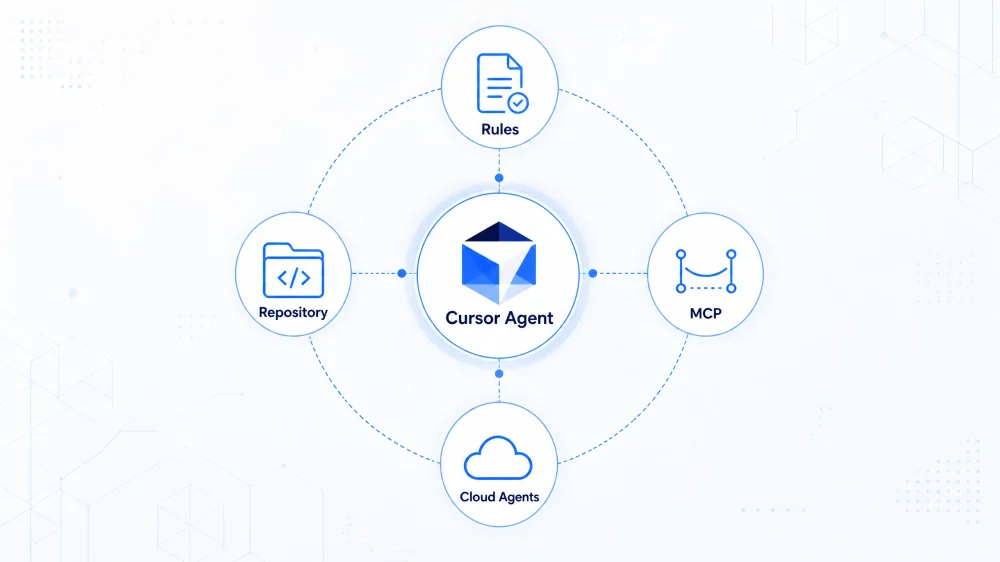
Cursor CLI brings AI-powered coding workflows directly to your command line. Whether running headless refactoring jobs, automated code reviews, or continuous integration steps, Cursor CLI extends repository-aware AI intelligence into terminal environments.
Productivity Workflow
flowchart TD
    A[Idea] --> B[Plan Mode]
    B --> C[Agent Creates Plan]
    C --> D[Repository Search]
    D --> E[Multi-file Edits]
    E --> F[Run Tests]
    F --> G[Review Changes]
    G --> H[Commit & Deploy]
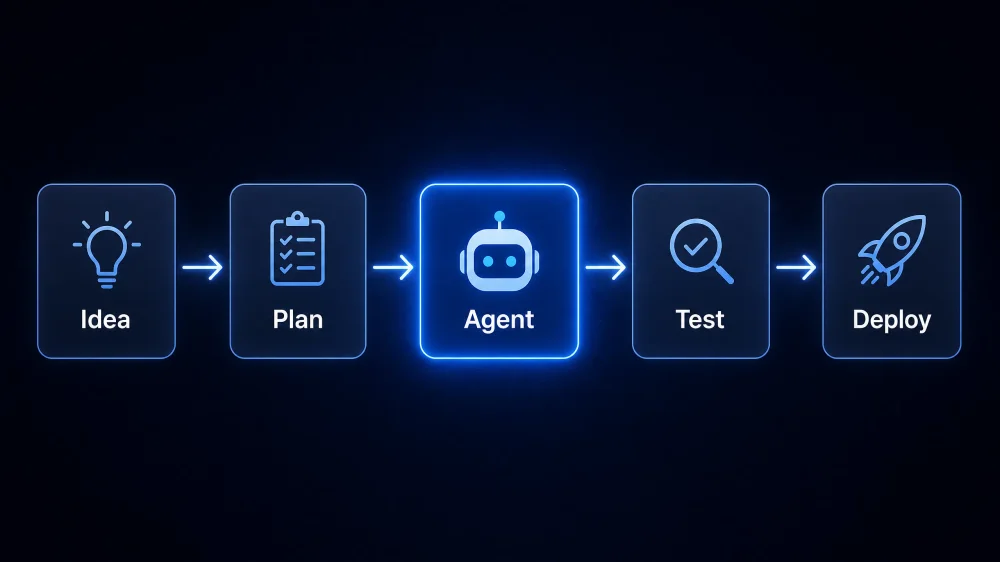
The biggest productivity gains come from combining Rules, MCP, Cloud Agents, and the CLI into repeatable workflows — not from using AI only for code completion.
Cursor Pricing
Cursor pricing (July 2026) uses included model usage pools on paid plans, plus optional pay-as-you-go when you exceed your allowance. All prices below are from Cursor’s official billing documentation; verify on cursor.com/pricing before purchasing.
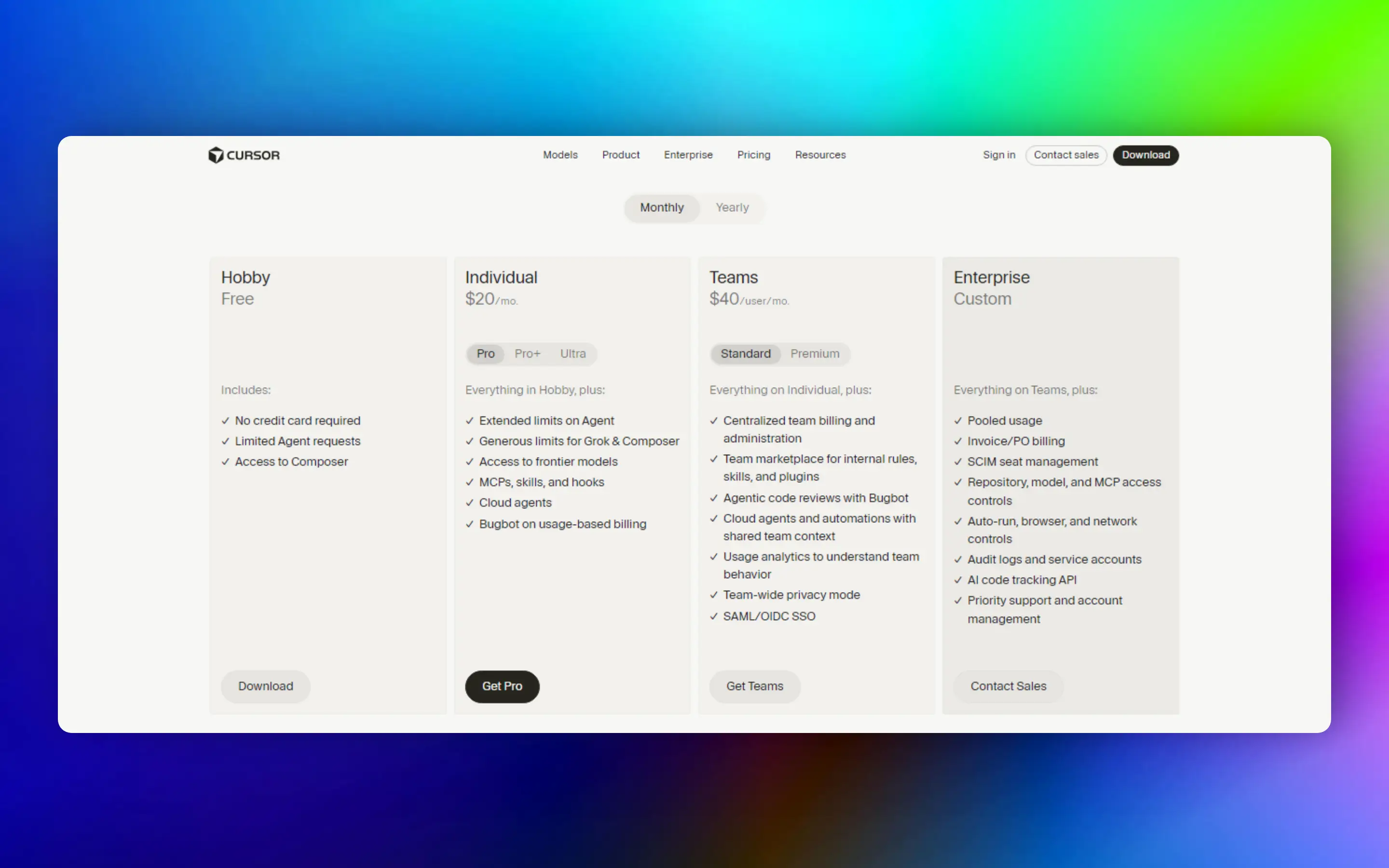
Source: Cursor official pricing page.
Individual plans
| Plan | Monthly price | Annual (≈20% off) | Included usage | Best for |
|---|---|---|---|---|
| Hobby | Free | — | Limited Agent, Chat & Tab (Auto model) | Trying Cursor |
| Pro | $20/mo | ~$16/mo | $20/mo of frontier model usage | Most working developers |
| Pro+ | $60/mo | ~$48/mo | $70/mo of frontier model usage | Heavy daily Agent use |
| Ultra | $200/mo | ~$160/mo | $400/mo of frontier model usage | Full-time AI-native workflows |
What every paid individual plan includes:
| Feature | Pro | Pro+ | Ultra |
|---|---|---|---|
| Unlimited Tab completions | Included | Included | Included |
| Cloud (background) Agents | Included | Included | Included |
| Bugbot | Included | Included | Included |
| MCP, Skills & Hooks | Included | Included | Included |
| Frontier model access | Included | Included | Included |
| Priority access to new features | — | — | Included |
How usage works: On paid plans, Auto model routing is designed for everyday Agent work without manually picking a model. When you select a specific frontier model (or use Max Mode), usage draws from your plan’s included pool. After the pool is used, you can enable on-demand usage or upgrade. Exact request counts vary by model because inference costs differ.
Teams & Enterprise
| Plan | Price | What you get |
|---|---|---|
| Teams Standard | $40/user/mo (~$32/user annual) | Central billing, admin dashboard, usage analytics, SAML/OIDC SSO, shared team rules, privacy controls |
| Teams Premium | $120/user/mo | Everything in Standard plus 5× the standard team usage allowance |
| Enterprise | Custom (annual) | Pooled usage, SCIM, audit logs, advanced access controls, priority support |
| Capability | Teams Standard | Teams Premium | Enterprise |
|---|---|---|---|
| Team billing | Included | Included | Included |
| Shared Rules | Included | Included | Included |
| Usage analytics | Included | Included | Included |
| SAML / OIDC | Included | Included | Included |
| Higher usage pool | Standard | 5× Standard | Pooled / custom |
| SCIM | — | — | Included |
| Audit logs | — | — | Included |
Which plan should you pick?
| Your situation | Recommended plan |
|---|---|
| Learning or side projects | Hobby (free) |
| Daily professional coding | Pro ($20/mo) |
| Agent runs most of the day; frequent overages on Pro | Pro+ ($60/mo) |
| Background agents + frontier models all day | Ultra ($200/mo) |
| Engineering team (5+ seats) | Teams Standard |
| Team with heavy shared Agent usage | Teams Premium |
For a broader comparison of Cursor against Copilot, Claude Code, and other tools, see Best AI Coding Assistants (2026).
Security & Privacy
Privacy Mode
When Privacy Mode is enabled:
- Code is not used for model training
- Cursor maintains zero-data-retention agreements with supported providers
- Temporary encrypted processing is used only to complete requests
- Enterprise administrators can enforce Privacy Mode across an organisation
Security Features
| Feature | Available |
|---|---|
| Privacy Mode | Included |
| Encryption | Included |
| SOC 2 Type II | Included |
| SAML / OIDC | Included |
| Audit Logs | Enterprise only |
| SCIM | Enterprise only |
Keyboard Shortcuts
| Shortcut | Action |
|---|---|
| Ctrl + L | Open / Toggle AI Chat |
| Ctrl + I | Toggle Side Panel |
| Ctrl + Shift + P | Command Palette |
| Ctrl + E | Background Agent Panel |
| Ctrl + . | Mode Menu |
| Ctrl + / | Switch AI Models |
| Ctrl + Shift + J | Cursor Settings |
All keybindings can be customised. Because Cursor is based on VS Code, many familiar shortcuts continue to work.
Best Practices
- Create Project Rules early — define coding standards before generating significant code.
- Use AGENTS.md — document architecture, conventions, testing strategy, and folder structure.
- Split large tasks — break “build my SaaS” into authentication, dashboard, API, billing, deployment.
- Review every AI change — read generated code, run tests, check security implications.
- Keep Rules updated — as your project evolves, update Rules so the Agent follows current conventions.
- Use our rule templates — start from downloadable packs instead of writing from scratch.
- Combine tools — Rules + MCP + CLI + Cloud Agents for repeatable workflows.
Common Mistakes
- Writing huge unstructured prompts
- Expecting the Agent to understand undocumented architecture
- Never creating Rules or AGENTS.md
- Accepting AI output without review
- Using Cloud Agents for interactive editing (use local Agent instead)
- Forgetting to verify generated code with tests
Frequently Asked Questions
Is Cursor better than VS Code?
Cursor is built on the VS Code ecosystem, retaining compatibility with familiar workflows while adding AI-native capabilities: Agents, Rules, MCP integration, and Cloud Agents. Whether it is “better” depends on whether those AI features align with your workflow.
Is Cursor free?
Yes. Cursor offers a free Hobby plan with limited Agent requests. Paid plans increase usage limits and unlock higher Agent allowances, frontier models, and Cloud Agents.
Which AI models does Cursor support?
Cursor supports multiple frontier AI models. The exact list evolves over time and depends on your subscription plan, with Auto mode selecting an appropriate model for many tasks.
Does Cursor work offline?
No. AI features require an internet connection because requests are processed through Cursor’s backend. Basic editing remains available offline.
Can Cursor understand my whole project?
Yes. Cursor indexes your repository and combines repository context, Rules, and Agent tooling to understand larger codebases more effectively than simple autocomplete systems.
What is Cursor Agent?
Cursor Agent is an AI assistant capable of reasoning across repositories, editing multiple files, using tools, executing terminal commands, and coordinating larger development tasks.
What are Cursor Rules?
Rules are reusable project or user instructions that guide the Agent’s behaviour without repeating the same prompt every time. See the Rules Complete Guide.
What is MCP?
The Model Context Protocol is a standard that allows AI assistants to connect to external tools and services. See the MCP Complete Guide.
Is my code used for AI training?
When Privacy Mode is enabled, Cursor states that your code is not used to train its models or those of its model providers.
Does Cursor replace software developers?
No. Cursor is a productivity tool. Developers remain responsible for architecture, validation, testing, deployment, and final review.
Glossary
| Term | Definition |
|---|---|
| Agent | Cursor’s AI orchestration layer that plans, searches, edits, and executes tasks |
| Rules | Persistent instructions (.mdc files or User Rules) included in Agent context |
| AGENTS.md | Plain Markdown project instructions without frontmatter metadata |
| MCP | Model Context Protocol — standard for connecting AI to external tools |
| Cloud Agent | Background agent that runs remotely for long-running tasks |
| Context Window | Maximum tokens the model can process in one conversation |
| Tab Completion | Inline code suggestions as you type |
| Plan Mode | Agent mode that designs an approach before editing code |
| Headless | CLI execution without the full editor UI, for automation |
TrendForge Verdict
Cursor has evolved from an AI-enhanced editor into a comprehensive AI development platform that combines intelligent Agents, Rules, repository awareness, MCP connectivity, Cloud Agents, and CLI automation.
For developers who invest time in learning these features — and configure Rules before generating code — Cursor can significantly reduce repetitive work and improve productivity across modern software projects.
Like any AI system, it performs best when guided by clear project conventions and careful human review rather than treated as a fully autonomous engineer.
Changelog
July 2026
- Initial publication of the complete Cursor AI guide
- Added downloadable rule templates for 6 frameworks
- Added copy-paste prompt library
- Published deep-dive guides for Rules, MCP, CLI, and Cloud Agents
- Added 15 workflow diagrams
- Updated pricing and Privacy Mode coverage
Last reviewed: July 2026
Related Articles
- Best AI Coding Assistants (2026)
- OpenRouter Complete Guide (2026)
- Cursor Rules: Complete Guide (2026)
- Cursor MCP: Complete Guide (2026)
- Cursor CLI: Complete Guide (2026)
- Cursor Cloud Agents Explained (2026)
- ChatGPT vs Claude: Which AI is Better? (2026)
References
Always refer to official documentation for the latest feature availability and pricing — Cursor evolves rapidly.